 The class of infinite-length impulse response (IIR) filters
can be characterized in the three domains: the time domain
via the impulse response h[n], the frequency domain
via the frequency response, and the z-domain via
poles and zeros.
This demo shows plots in the three domains for a variety
of choices of the feedback coefficients in first- and second-order
IIR filters.
Similar plots can be generated interactively by using the
MATLAB graphical user interface tool called
PeZ.
The class of infinite-length impulse response (IIR) filters
can be characterized in the three domains: the time domain
via the impulse response h[n], the frequency domain
via the frequency response, and the z-domain via
poles and zeros.
This demo shows plots in the three domains for a variety
of choices of the feedback coefficients in first- and second-order
IIR filters.
Similar plots can be generated interactively by using the
MATLAB graphical user interface tool called
PeZ.
have an impluse response given by:
Usually the parameter a is taken to be a real number. However, if a is chosen to be complex, then the impulse response of the first-order IIR filter can be written as:
Thus, an oscillating signal (sinusoid) can be produced by specifying
the appropriate value for a and taking either the real
or imaginary part of the impulse response.
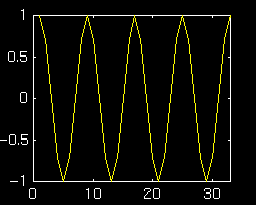
In MATLAB we can generate the output using the filter
command. Here are the series of MATLAB commands that will generate
the first order oscillator:
 >>imp=([0:33]==0);                     % <-- length 34 impulse
 >>y=filter(1,[1 -exp(j*2*pi/8)],imp);  % <-- filter the impulse
 >>plot(real(y))                        % <-- take the real part
Let's try another example. This time we'll use
a = 1 ejπ/10
 >>imp=([0:40]==0);                      % <-- length 41 impulse
 >>y=filter(1,[1 -exp(j*2*pi/20)],imp);  % <-- filter the impulse
 >>plot(real(y))                         % <-- take the real part
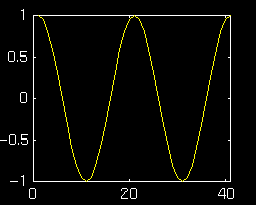
This time the frequency of the oscillator is
2π/20.
Clearly the angle of the feedback term is equal to the frequency of
oscillation.
Assuming the filter coefficients to be strictly real implies that the poles of the filter will occur in conjugate pairs:
Expanding the factored polynomial shows the relationship between the filter coefficients, a1 and a2, and the magnitude and phase of the poles:
Remember, the above relationship holds only when the poles are conjugate
pairs. By setting
a2 = -1
we
can ensure that the oscillator does not decay with time. Now by
simply varying a1 we can control
the frequency of oscillation. Below are some examples that
demonstrate the relationship between filter coefficients, pole
locations and frequency of oscillation.
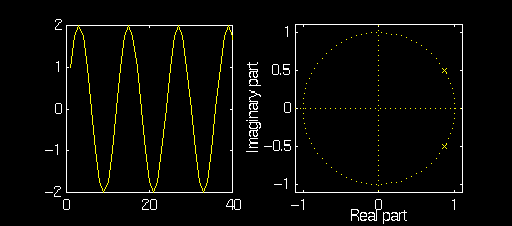
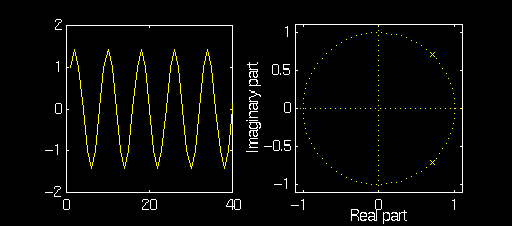
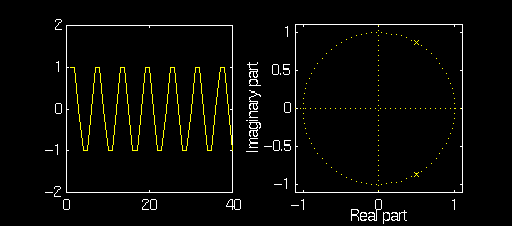
Note how the magnitude of the poles remains equal to one but the
angle changes with a1.
Also note how the amplitude of the oscillator changes for
different a1. This is because a1 and
a2 do not provide independent
control over the amplitude and frequency of the ocsillator.
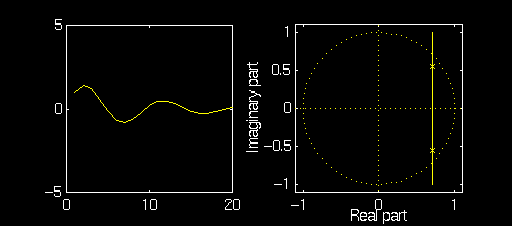
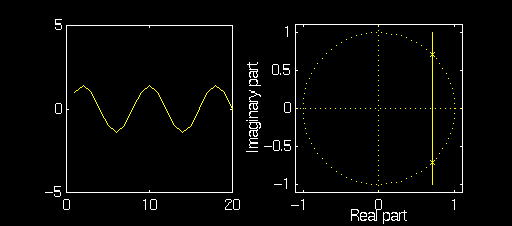
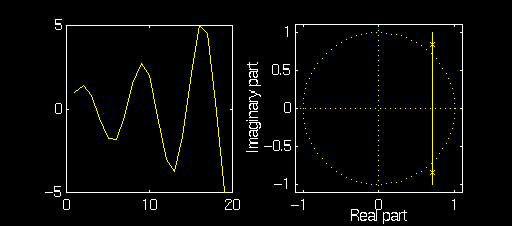
Note that as a2 is changed the the poles move along a vertical line
that intersects the x-axis at
x = cos(π/4)
The filter coefficient
a2 can also be seen to affect the frequency of oscillation. This
is because a1 and a2
do not provide independent
control over the amplitude and frequency of the ocsillator. Note
also that if a2 has magnitude less
than one the oscillator
decays while if the magnitude of a1
is greater than one the oscillator grows over time.
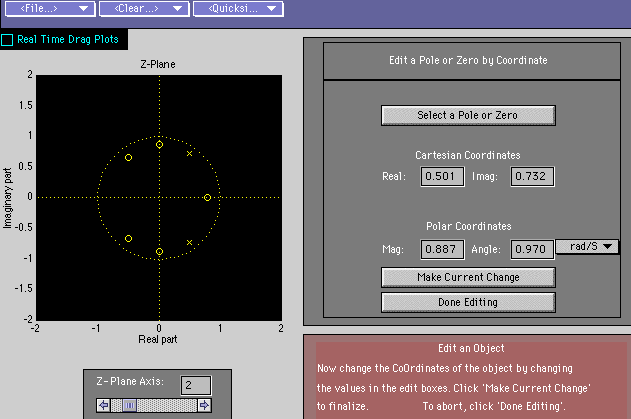
Note the poles have magnitude equal to one and angles equal to π/8. Pez returns the following for plots for the impulse and frequency response:
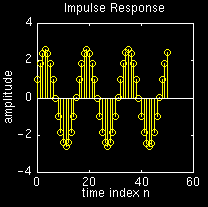
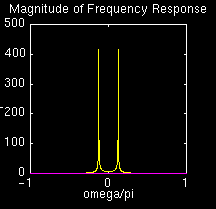
While it is difficult to measure the frequency of the oscillator
from the above graph it can be seen to be approximately
2π/16,
which is the value we expected.
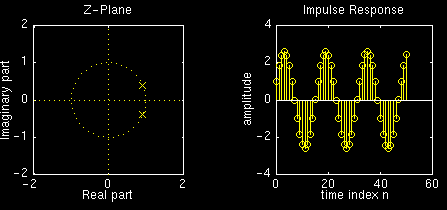
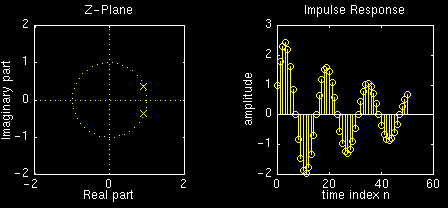
Here are the plots for r=1:
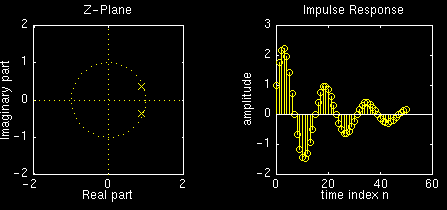
Now here are the plots for r=0.975:
Now here are the plots for r=0.95:
Now here are the plots for r=0.925:
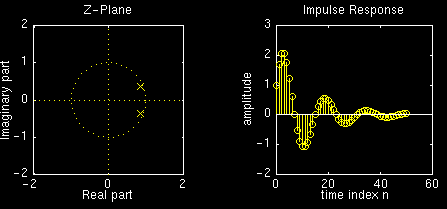
Note how the amplitude of the impulse reponse decays faster with smaller values of r.
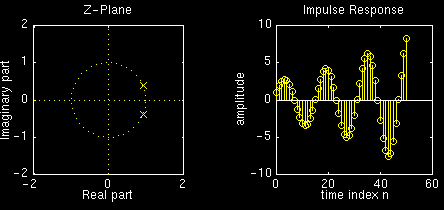
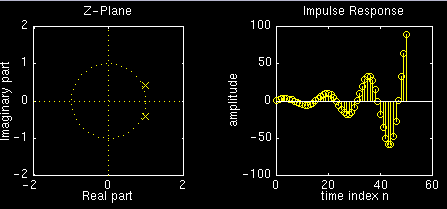
Here are the plots for r=1:
Now here are the plots for r=1.025:
Now here are the plots for r=1.05:
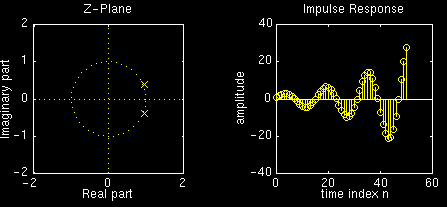
Now here are the plots for
r=1.075:
Note how the amplitude of the impulse reponse decays faster with smaller values of r.
 McClellan, Schafer, and Yoder, Signal Processing First, ISBN 0-13-065562-7.